Posts

Showing posts with the label Cisco

Cisco IPVersity Writeup Lab 3: In Jail?
Image
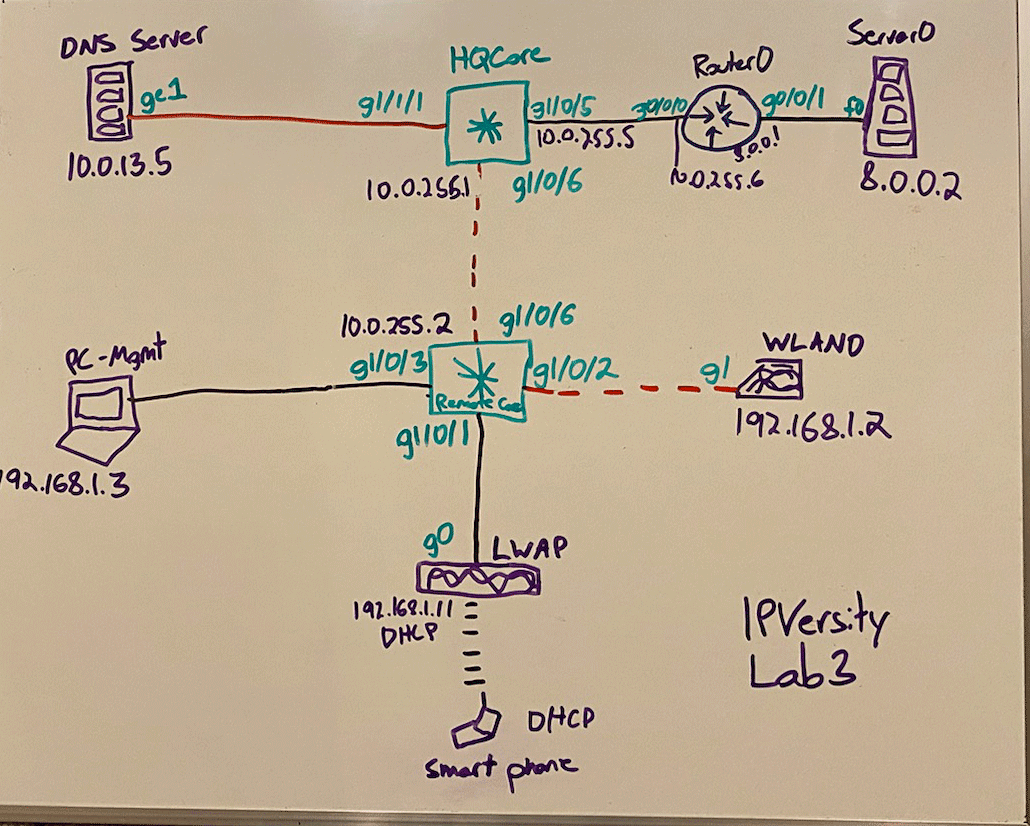
Lab #3 is here: Ipversity Well this one took me two days and I needed to whiteboard it. The Smartphone, WLAN was simple, getting to 8.0.0.2 got me. I thought the creator set up a Static Route to send 192.168.1.0/24 and 10.0.0.0/24 traffic back to our internal DNS Server. Then I thought hmm.. I can't set up/change Static Routes (its in the rules), do they want me to NAT it? Nothing is said about OSPF either. Its quite possible NAT and/or OSPF is a solution to this network topology. I will update this blogpost when the creator publishes his solution. Ipversity Lab #3 Writeup Step 1: This step might seem odd, but after research I wanted to tackle OSPF first. Remote Core uses OSPF 1 with router-id "10.10.10.10". HQ Core uses OSPF 1 with router-id "20.20.20.20". Lets set up OSPF1 with router-id "30.30.30.30" on Router0. Great, now MGMT-PC can ping 8.0.0.2. Lets change the MGMT-PC DNS entry to point to 10.0.13.5. Lets configure our WLAN. O...

Cisco Ipversity Lab 2 Writeup: Bamboozled by VoIP

Image
Fix My Lab Challenge #2 (5-4-20) Link to Lab: https://ipversity.com/fix-my-lab I was so focused on the IP Phones I learned about them, and then realized they were bait. This video shows how to configure Cisco IP Phones: https://www.youtube.com/watch?v=RB4LiS2lIXo . You don't need to know, but its interesting anyway. The Layer 3 Switch in Packet Tracer can't handle VoIP. A Router can. I looked on Youtube and found 0 vidoes on L3 Switches being the main source for VoIP. Its probably possible on GNS3 and physical equipment. Not so for Packet Tracer. The objectives never point out to fixing VoIP. The phones are just there to distract and trick you. Treat them like they are invisible. I never knew a connection could pass with a non-configured Cisco IP-Phone. I tried to enable "ip routing" on the L3 Switch and that did not turn the telephony option on. The initial config on the Switch ACTS as if VoIP will work, with DHCP set up for vlan 10 "DATA" and vlan ...

Cisco Ipversity Lab 1 Writeup

Image
I haven't touched Cisco since CCDC. I found Ipversity on twitter and thought this would be good practice for my rusty skills. I remembered most of the commands and even how to implement OSPF. During my Cisco 1 and 4 classes, I always wished there was a 'Fix this network topology' website that was like Vulnhub. Well its finally here! I couldn't wait to dive in. Warning - Spoilers Lab 1 The first thing I do is get out a piece of printer paper. I draw the diagram and use markers to see the connection. I write down interfaces and IP addresses too. I start on the end-devices and work my way inwards. The second thing you need to do is turn on interface g0/0/1 on Router 1 (I'll call it B due to habit). Packet Tracer will show the red triangles which means its off. The next step is to fix the subnet mask on RouterA's g0/0/1 interface. It should be 255.255.255.252, not 255.255.255.240. Our OSPF config won't like this. Do a shut/no shut once you ch...

Networking Personal Capstone Complete - 1 Year Later

Image
I finally did it! I completed my personal goals for Networking! I used to be a double major in Networking. I didn't consider myself worthy though. I didn't know enough. I made some goals for myself to in-my-mind earn my lost degree that I didn't deserve. My personal capstone was to make a COMPLETE replica of the CCDC topology. I got 80% there. Three things were missing... INTERNET, a Router, and a Switch. I found out today you can import a Cisco CSR 1000v into VM Workstation. And guess WHAT! I figured it out in under 15 MINUTES! Here are my Slack logs: I remember struggling with this "internet" issue on the PA-VM for an ENTIRE WEEK. I just blew Amanda-2018 out of the water by 10000%. I seriously lost 16 hours with "trying to get internet to my VM Workstation" in 2018. Looking back on it I was in Cisco 1 and HAD no idea what I was doing. I was playing around with EIGRP and OSPF and that wasn't taught until Cisco 3. I'm in a pretty un...

Off the Rails: CCNA Security Review

Image
CCNA Security: Off The Rails I passed my CCNA Security on August 19, 2019. Before I passed, I failed it. Before I failed it, I was one month late taking it. My journey started in late June. I planned to take the exam July 20. I thought a month would be sufficient since thats what it took for the CCNA R&S. Well.. work got out of control where I wasn't working 40 hours anymore. I had some Shift 1 and Shift 2 days. I study in the evenings after work so I couldn't do this anymore. Not having my evenings slowed me down. When I did have my evenings I was stressed and tired. I created a plan to fix this. My plan was to RUN to wake myself up so I could study for my CCNA Security. I would run for 20 minutes and jump on a rock 20 times. I did pushups when I got tired. I literally ran, jump, and did pushups.. to wake myself up... to study for my CCNA Security. Energy became a precious commodity. Attempt 1: Failure I assumed the CCNA Security exam would be in the same ballpar...

Second Professional Presentation

Image
My second presentation was titled "Computer Networking for Noobs". I gave an overview to my coworkers about what I've been doing for the past year. I setup static routes, EIGRP, and OSPF in GNS3. I had to troubleshoot three different issues so it was a real-life example. (yaaay unintended presentation problems!) Luckily it took under 5 minutes for each which is tolerable. Real-Life Errors 1. R2 and R1 mixed up on graph. Configured wrong router. 2. Put in 192.168.0.0 address on an interface which interfered with static route. This was due to the switch up. Tried to get to 192.168.0.0 while ghost interface g1/0 had same address. 3. Forgot to do one network command for EIGRP. Minor 10 second mistake. I think I did better than my first presentation. I could've explained things better. I didn't explain wildcard masks. I accomplished my goal. People know Cisco/Networking exists and have more information to get started. Here is a link to my second presentatio...

CCNA ICND2 Review

Image
Time I studied for a total of 4 weeks. I didn't understand Cisco 3 and went solo for Cisco 4. I relearned Cisco 3 content and self-taught Cisco 4. The CCENT felt like a 800 meter sprint and the CCNA felt like a 6-mile cross country race. I just panicked about 4 times. I was more prepared for the ICDN2 then the ICDN1. How I studied 1. Go to work 2. Walk the cat 3. Go on a Run/Bike Ride 4. Do Cisco THE ENTIRE NIGHT. My goal was 2 hours but I wasn't counting. 5. Weekends: Go to Starbucks or the Library. Or both. I did Cisco everyday for 30 days straight for 2-4 hours. Internet Opinion I was searching for how long it would take to study for the ICDN2. I got mostly 8-9 month answers. That's too long! It should take 1-3 months. Those people are either extremely overprepared, not following the exam topics PDF, procrastinating, or going a very slow pace. The exam topic sheet is only three pages long. One page shorter than the CCENT. Make a timeline! Racing Against T...

CCENT ICND1 Review

Image
Time I studied two hours everyday for two weeks. I took Cisco 1 - 2 classes at Lakeland Community College. Materials 1. Boson Practice Exam 2. Cisco Labs 3. Cisco ICND1 Syllabus 4. Youtube Positives Studying for the CCENT filled gaps in my knowledge base. I was doing switchport modes wrong. I know end-devices are switchport mode access now. I figured out how to calculate wildcard submasks. All I knew how to do was 0.0.0.255. I didn't know what full or half duplex was. My subnetting skills were rocky. Cisco labs don't do a good job at explaining concepts. The lab sheet will say "do X command". The Boson practice exam will explain concepts much better. "Oh thats why were doing that" is the feeling you'll get. Regrets I wish I would've took the CCENT over winter break after Cisco 2 was finished. Oh well. Tips I used this to generate a subnet problem: https://www.lammle.com/ip-subnet-practice-page/ And this to validate answers: https:...